라즈베리 파이뿐만 아니라, 대부분의 linux에서는 이러한 문제가 발생한다.
그 이유는 Arduino R4 Minima가 내부적으로 USB장치처럼 동작하기 때문이다.
아래는 Windows에서의 컴파일 및 업로드 과정의 일부이다.
스케치는 프로그램 저장 공간 38936 바이트(14%)를 사용. 최대 262144 바이트.
전역 변수는 동적 메모리 3944바이트(12%)를 사용, 28824바이트의 지역변수가 남음.  최대는 32768 바이트.
"C:\Users\mukea\AppData\Local\Arduino15\packages\arduino\tools\dfu-util\0.11.0-arduino5/dfu-util" --device 0x2341:0x0069,:0x0369 -D "C:\Users\mukea\AppData\Local\arduino\sketches\76FB0540379510AAD4D30F2A9F8962B6/serialtest.ino.bin" -a0 -Q
dfu-util 0.11-arduino4

Copyright 2005-2009 Weston Schmidt, Harald Welte and OpenMoko Inc.
Copyright 2010-2021 Tormod Volden and Stefan Schmidt
This program is Free Software and has ABSOLUTELY NO WARRANTY
Please report bugs to http://sourceforge.net/p/dfu-util/tickets/

Opening DFU capable USB device...
Device ID 2341:0069
Run-Time device DFU version 0101
Claiming USB DFU (Run-Time) Interface...
Setting Alternate Interface zero...
Determining device status...
DFU state(0) = appIDLE, status(0) = No error condition is present
Device really in Run-Time Mode, send DFU detach request...
Device will detach and reattach...
Opening DFU USB Device...
Claiming USB DFU Interface...
Setting Alternate Interface #0 ...
Determining device status...
DFU state(2) = dfuIDLE, status(0) = No error condition is present
DFU mode device DFU version 0101
Device returned transfer size 64
Copying data from PC to DFU device
살펴보면 USB 장치를 뗐다 붙였다 하며 작업을 하는 것을 알 수 있다.
이 때문에 linux에서 Arduino R4 Minima를 원활하게 사용하기 위해서는 여러 작업이 요구된다.
이 글에서는 이 방법에 대해 서술한다.
권한 설정
이 현상에 대해 분석한 글들을 보면 대부분 linux에서의 USB 접근 권한 문제를 문제로 꼽는다.
먼저 arduino-cli를 이용해 보드의 포트를 확인한다.
sprout1345@sproutpi:~$ arduino-cli board list
Port          Protocol Type              Board Name            FQBN                       Core
/dev/ttyACM0  serial   Serial Port (USB) Arduino Uno           arduino:avr:uno            arduino:avr
/dev/ttyACM1  serial   Serial Port (USB) Arduino UNO R4 Minima arduino:renesas_uno:minima arduino:renesas_uno
/dev/ttyAMA10 serial   Serial Port       Unknown
"/dev/ttyACM0", "/dev/ttyACM1", "/dev/ttyAMA10" 등이 포트 경로이다.
포트 경로를 확인했으면 다음의 명령을 실행한다.
ls -l /dev/ttyACM*
ls -l /dev/ttyAMA*
그러면 아래와 같이 장치 파일에 대한 속성이 나타난다.
sprout1345@sproutpi:~$ ls -l /dev/ttyACM*
crw-rw---- 1 root dialout 166, 0 Jan  9 22:00 /dev/ttyACM0
crw-rw---- 1 root dialout 166, 1 Jan  9 23:06 /dev/ttyACM1
sprout1345@sproutpi:~$ ls -l /dev/ttyAMA*
crw-rw---- 1 root dialout 204, 74 Jan  9 22:00 /dev/ttyAMA10
해당 속성들을 살펴보면, 모두 root가 생성하고, dialout 그룹의 사용자가 소유하고 있다는 것을 알 수 있다.
따라서, 사용자를 저 dialout 그룹에 추가하면 해당 파일을 소유할 수 있다.
아래의 예문을 참고하여 명령을 입력한다.
sudo usermod -a -G dialout <username>
필자의 경우, 아래의 명령을 입력하였다.
sudo usermod -aG dialout sprout1345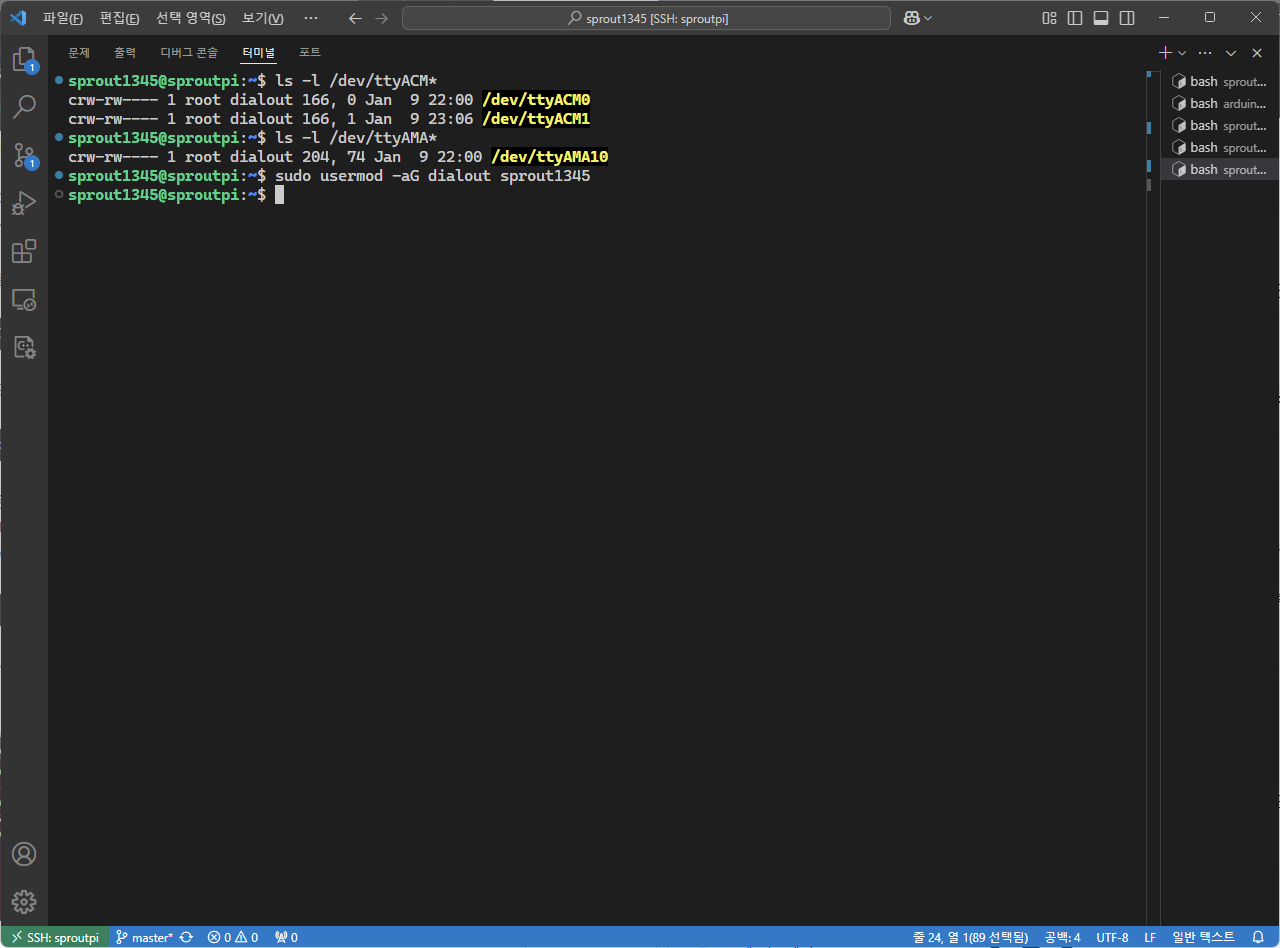
변경사항을 적용하려면 로그아웃 후 다시 로그인하거나, 시스템을 재부팅해야 한다.
사용자가 dialout 그룹에 제대로 추가되었는지 확인하려면 아래의 명령을 입력한다.
groups <username>
필자의 경우는 아래와 같다.
groups sprout1345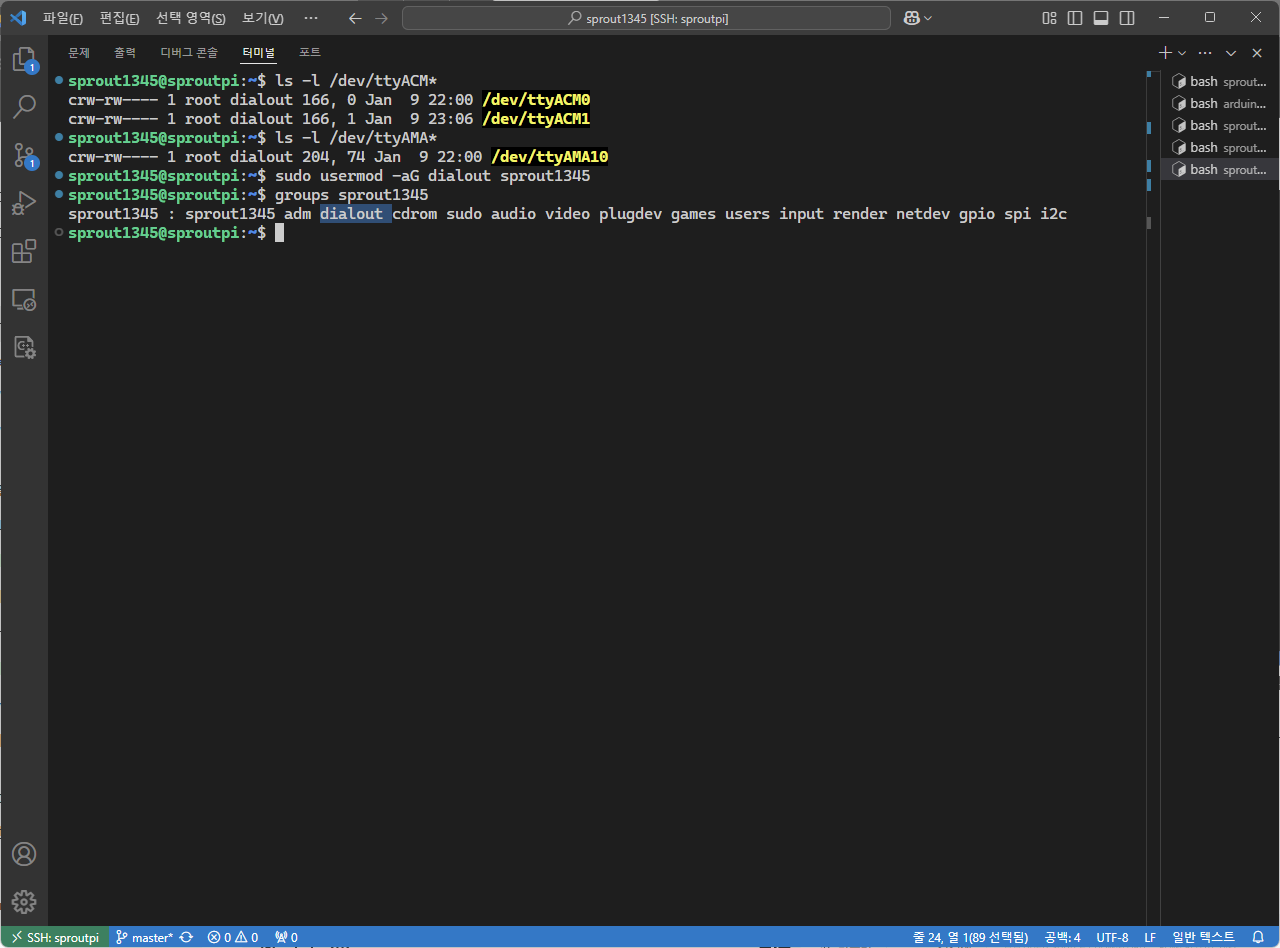
나타난 목록에 "dialout"이 있으므로 사용자가 정상적으로 그룹에 추가되었다.
그러나, 경우에 따라 이것으로도 부족한 경우가 있다.
이런 경우, USB 디바이스에 접근하기 위한 추가적인 udev 규칙을 생성해야 한다.
아래의 명령을 입력한다.
sudo nano /etc/udev/rules.d/50-arduino-dfu.rules
nano 편집기가 열리면, 내용을 입력한다.

이름은 아래의 규칙에 따라 기입한다.
ACTION=="action", SUBSYSTEM=="subsystem", ATTR{attribute}=="value", NAME="device_name", SYMLINK="symlink_name", MODE="mode", RUN+="command"
먼저 오류 코드를 본다.
"/home/sprout1345/.arduino15/packages/arduino/tools/dfu-util/0.11.0-arduino5/dfu-util" --device 0x2341:0x0069,:0x0369 -D "/home/sprout1345/.cache/arduino/sketches/835FEA06AD91E56FE86211764961F53B/Relay.ino.bin" -a0 -Q
dfu-util: Cannot open DFU device 2341:0069 found on devnum 2 (LIBUSB_ERROR_ACCESS)
dfu-util: No DFU capable USB device available
dfu-util 0.11-arduino4

Copyright 2005-2009 Weston Schmidt, Harald Welte and OpenMoko Inc.
Copyright 2010-2021 Tormod Volden and Stefan Schmidt
This program is Free Software and has ABSOLUTELY NO WARRANTY
Please report bugs to http://sourceforge.net/p/dfu-util/tickets/

Error during Upload: Failed uploading: uploading error: exit status 74
오류 코드에서 디바이스 ID가 2341:0069와 2341:0369이므로, 아래와 같이 입력한다. 추가로 뜨면 그것도 다른 줄로 추가한다.
SUBSYSTEM=="usb", ATTR{idVendor}=="2341", ATTR{idProduct}=="0069", MODE="0660", GROUP="dialout"
SUBSYSTEM=="usb", ATTR{idVendor}=="2341", ATTR{idProduct}=="0369", MODE="0660", GROUP="dialout"
저장 후 아래의 명령을 실행한다.
sudo udevadm control --reload-rules
sudo udevadm trigger
정상적으로 업로드되는지 확인한다.
"/home/sprout1345/.arduino15/packages/arduino/tools/dfu-util/0.11.0-arduino5/dfu-util" --device 0x2341:0x0069,:0x0369 -D "/home/sprout1345/.cache/arduino/sketches/6ABD684E3B4A3EDB36E289304B152B86/test.ino.bin" -a0 -Q
dfu-util 0.11-arduino4

Copyright 2005-2009 Weston Schmidt, Harald Welte and OpenMoko Inc.
Copyright 2010-2021 Tormod Volden and Stefan Schmidt
This program is Free Software and has ABSOLUTELY NO WARRANTY
Please report bugs to http://sourceforge.net/p/dfu-util/tickets/

Opening DFU capable USB device...
Device ID 2341:0069
Run-Time device DFU version 0101
Claiming USB DFU (Run-Time) Interface...
Setting Alternate Interface zero...
Determining device status...
DFU state(0) = appIDLE, status(0) = No error condition is present
Device really in Run-Time Mode, send DFU detach request...
Device will detach and reattach...
Opening DFU USB Device...
Claiming USB DFU Interface...
Setting Alternate Interface #0 ...
Determining device status...
DFU state(2) = dfuIDLE, status(0) = No error condition is present
DFU mode device DFU version 0101
Device returned transfer size 64
Copying data from PC to DFU device
Download        [=========================] 100%        38944 bytes
Download done.
DFU state(7) = dfuMANIFEST, status(0) = No error condition is present
DFU state(2) = dfuIDLE, status(0) = No error condition is present
Done!

Used platform       Version Path
arduino:renesas_uno 1.3.2   /home/sprout1345/.arduino15/packages/arduino/hardware/renesas_uno/1.3.2
참고 자료
https://codezoo.tistory.com/59
Arduino UNO R4 & LTE CATM1 모뎀 동작테스트 + 리눅스 개발TIP
Arduino에서 최근 UNO R4를 출시했습니다. 기존 ATMega328P 8비트 프로세서에서 Renesas ARM Cortex-M4 32비트 프로세서로 성능을 크게 업그레이드하고 기본 메모리 용량도 2KB에서 32KB로 대폭 늘렸습니다. UNO
codezoo.tistory.com
https://fishpoint.tistory.com/8755
아두이노 우노 R4 설치 - Arduino IDE 2.0
아두이노 IDE 2.0 다운로드 및 설치하기이 튜토리얼에서는 Windows, Mac 또는 Linux 컴퓨터에 Arduino IDE 2를 다운로드하고 설치하는 방법을 보여드립니다. 편집기는 Arduino 소프트웨어 페이지
fishpoint.tistory.com
Upload to UNO R4 Minima from Linux machine fails: "LIBUSB_ERROR_ACCESS"
In order for Arduino IDE to upload to the Arduino board, your user account must have write permission for that device. Standard user accounts don't have this permission by default. This error can occur when you attempt an upload without the necessary permi
forum.arduino.cc
'Raspberry Pi' 카테고리의 다른 글
| Raspberry Pi #13 - Raspberry Pi 5에서 UART를 통해 Raspberry Pi Zero 2 WH에 접속하기 (0) | 2025.11.01 |
|---|---|
| Raspberry Pi #12 - waifu2x-ncnn-vulkan (0) | 2025.10.01 |
| Raspberry Pi #10 - Arduino CLI를 이용한 Arduino 프로그래밍 (3) | 2025.08.01 |
| Raspberry Pi #9 - Raspberry Pi에 저장된 네트워크 연결 정보 변경하기 (0) | 2025.07.01 |
| Raspberry Pi #8 - Raspberry Pi 5에서 BitNet AI 모델을 로컬로 실행 (2) | 2025.05.01 |


댓글