전에도 말하였듯, 필자는 라즈베리 파이에 SSH 접속을 한다.
며칠 전, 우연찮게 필자의 라즈베리 파이는 비밀번호 접속이 가능하다는 사실을 발견하였다.
더보기
C:\Windows\System32>ssh -v sprout1345@sproutpi
OpenSSH_for_Windows_9.5p1, LibreSSL 3.8.2
debug1: Reading configuration data __PROGRAMDATA__\\ssh/ssh_config
debug1: Connecting to sproutpi [fe80::2ecf:67ff:fea8:6995%15] port 22.
debug1: Connection established.
debug1: identity file C:\\Users\\mukea/.ssh/id_rsa type -1
debug1: identity file C:\\Users\\mukea/.ssh/id_rsa-cert type -1
debug1: identity file C:\\Users\\mukea/.ssh/id_ecdsa type -1
debug1: identity file C:\\Users\\mukea/.ssh/id_ecdsa-cert type -1
debug1: identity file C:\\Users\\mukea/.ssh/id_ecdsa_sk type -1
debug1: identity file C:\\Users\\mukea/.ssh/id_ecdsa_sk-cert type -1
debug1: identity file C:\\Users\\mukea/.ssh/id_ed25519 type -1
debug1: identity file C:\\Users\\mukea/.ssh/id_ed25519-cert type -1
debug1: identity file C:\\Users\\mukea/.ssh/id_ed25519_sk type -1
debug1: identity file C:\\Users\\mukea/.ssh/id_ed25519_sk-cert type -1
debug1: identity file C:\\Users\\mukea/.ssh/id_xmss type -1
debug1: identity file C:\\Users\\mukea/.ssh/id_xmss-cert type -1
debug1: identity file C:\\Users\\mukea/.ssh/id_dsa type -1
debug1: identity file C:\\Users\\mukea/.ssh/id_dsa-cert type -1
debug1: Local version string SSH-2.0-OpenSSH_for_Windows_9.5
debug1: Remote protocol version 2.0, remote software version OpenSSH_9.6p1 Ubuntu-3ubuntu13.8
debug1: compat_banner: match: OpenSSH_9.6p1 Ubuntu-3ubuntu13.8 pat OpenSSH* compat 0x04000000
debug1: Authenticating to sproutpi:22 as 'sprout1345'
debug1: load_hostkeys: fopen C:\\Users\\mukea/.ssh/known_hosts: No such file or directory
debug1: load_hostkeys: fopen C:\\Users\\mukea/.ssh/known_hosts2: No such file or directory
debug1: load_hostkeys: fopen __PROGRAMDATA__\\ssh/ssh_known_hosts: No such file or directory
debug1: load_hostkeys: fopen __PROGRAMDATA__\\ssh/ssh_known_hosts2: No such file or directory
debug1: SSH2_MSG_KEXINIT sent
debug1: SSH2_MSG_KEXINIT received
debug1: kex: algorithm: curve25519-sha256
debug1: kex: host key algorithm: ssh-ed25519
debug1: kex: server->client cipher: chacha20-poly1305@openssh.com MAC: <implicit> compression: none
debug1: kex: client->server cipher: chacha20-poly1305@openssh.com MAC: <implicit> compression: none
debug1: expecting SSH2_MSG_KEX_ECDH_REPLY
debug1: SSH2_MSG_KEX_ECDH_REPLY received
debug1: Server host key: ssh-ed25519 SHA256:BpRzFYYWivkmp2mWQQBH8kALzbraHVSQCODXiI/v2VY
debug1: load_hostkeys: fopen C:\\Users\\mukea/.ssh/known_hosts: No such file or directory
debug1: load_hostkeys: fopen C:\\Users\\mukea/.ssh/known_hosts2: No such file or directory
debug1: load_hostkeys: fopen __PROGRAMDATA__\\ssh/ssh_known_hosts: No such file or directory
debug1: load_hostkeys: fopen __PROGRAMDATA__\\ssh/ssh_known_hosts2: No such file or directory
debug1: hostkeys_find_by_key_hostfile: hostkeys file C:\\Users\\mukea/.ssh/known_hosts does not exist
debug1: hostkeys_find_by_key_hostfile: hostkeys file C:\\Users\\mukea/.ssh/known_hosts2 does not exist
debug1: hostkeys_find_by_key_hostfile: hostkeys file __PROGRAMDATA__\\ssh/ssh_known_hosts does not exist
debug1: hostkeys_find_by_key_hostfile: hostkeys file __PROGRAMDATA__\\ssh/ssh_known_hosts2 does not exist
The authenticity of host 'sproutpi (fe80::2ecf:67ff:fea8:6995%15)' can't be established.
ED25519 key fingerprint is SHA256:BpRzFYYWivkmp2mWQQBH8kALzbraHVSQCODXiI/v2VY.
This key is not known by any other names.
Are you sure you want to continue connecting (yes/no/[fingerprint])? yes
Warning: Permanently added 'sproutpi' (ED25519) to the list of known hosts.
debug1: ssh_packet_send2_wrapped: resetting send seqnr 3
debug1: rekey out after 134217728 blocks
debug1: SSH2_MSG_NEWKEYS sent
debug1: expecting SSH2_MSG_NEWKEYS
debug1: ssh_packet_read_poll2: resetting read seqnr 3
debug1: SSH2_MSG_NEWKEYS received
debug1: rekey in after 134217728 blocks
debug1: get_agent_identities: ssh_get_authentication_socket: No such file or directory
debug1: Will attempt key: C:\\Users\\mukea/.ssh/id_rsa
debug1: Will attempt key: C:\\Users\\mukea/.ssh/id_ecdsa
debug1: Will attempt key: C:\\Users\\mukea/.ssh/id_ecdsa_sk
debug1: Will attempt key: C:\\Users\\mukea/.ssh/id_ed25519
debug1: Will attempt key: C:\\Users\\mukea/.ssh/id_ed25519_sk
debug1: Will attempt key: C:\\Users\\mukea/.ssh/id_xmss
debug1: Will attempt key: C:\\Users\\mukea/.ssh/id_dsa
debug1: SSH2_MSG_EXT_INFO received
debug1: kex_input_ext_info: server-sig-algs=<ssh-ed25519,ecdsa-sha2-nistp256,ecdsa-sha2-nistp384,ecdsa-sha2-nistp521,sk-ssh-ed25519@openssh.com,sk-ecdsa-sha2-nistp256@openssh.com,rsa-sha2-512,rsa-sha2-256>
debug1: kex_ext_info_check_ver: publickey-hostbound@openssh.com=<0>
debug1: kex_ext_info_check_ver: ping@openssh.com=<0>
debug1: SSH2_MSG_SERVICE_ACCEPT received
debug1: Authentications that can continue: publickey,password
debug1: Next authentication method: publickey
debug1: Trying private key: C:\\Users\\mukea/.ssh/id_rsa
debug1: Trying private key: C:\\Users\\mukea/.ssh/id_ecdsa
debug1: Trying private key: C:\\Users\\mukea/.ssh/id_ecdsa_sk
debug1: Trying private key: C:\\Users\\mukea/.ssh/id_ed25519
debug1: Trying private key: C:\\Users\\mukea/.ssh/id_ed25519_sk
debug1: Trying private key: C:\\Users\\mukea/.ssh/id_xmss
debug1: Trying private key: C:\\Users\\mukea/.ssh/id_dsa
debug1: Next authentication method: password
sprout1345@sproutpi's password:
출력을 보면 여러 인증 방법을 시도하였지만 실패하자, 마지막 방법으로 비밀번호를 요구하는 것을 볼 수 있다.
C:\Windows\System32>ssh -v sprout1345@sproutpi
OpenSSH_for_Windows_9.5p1, LibreSSL 3.8.2
debug1: Reading configuration data __PROGRAMDATA__\\ssh/ssh_config
debug1: Connecting to sproutpi [fe80::2ecf:67ff:fea8:6995%15] port 22.
debug1: Connection established.
debug1: identity file C:\\Users\\mukea/.ssh/id_rsa type -1
debug1: identity file C:\\Users\\mukea/.ssh/id_rsa-cert type -1
debug1: identity file C:\\Users\\mukea/.ssh/id_ecdsa type -1
debug1: identity file C:\\Users\\mukea/.ssh/id_ecdsa-cert type -1
debug1: identity file C:\\Users\\mukea/.ssh/id_ecdsa_sk type -1
debug1: identity file C:\\Users\\mukea/.ssh/id_ecdsa_sk-cert type -1
debug1: identity file C:\\Users\\mukea/.ssh/id_ed25519 type -1
debug1: identity file C:\\Users\\mukea/.ssh/id_ed25519-cert type -1
debug1: identity file C:\\Users\\mukea/.ssh/id_ed25519_sk type -1
debug1: identity file C:\\Users\\mukea/.ssh/id_ed25519_sk-cert type -1
debug1: identity file C:\\Users\\mukea/.ssh/id_xmss type -1
debug1: identity file C:\\Users\\mukea/.ssh/id_xmss-cert type -1
debug1: identity file C:\\Users\\mukea/.ssh/id_dsa type -1
debug1: identity file C:\\Users\\mukea/.ssh/id_dsa-cert type -1
debug1: Local version string SSH-2.0-OpenSSH_for_Windows_9.5
debug1: Remote protocol version 2.0, remote software version OpenSSH_9.6p1 Ubuntu-3ubuntu13.8
debug1: compat_banner: match: OpenSSH_9.6p1 Ubuntu-3ubuntu13.8 pat OpenSSH* compat 0x04000000
debug1: Authenticating to sproutpi:22 as 'sprout1345'
debug1: load_hostkeys: fopen C:\\Users\\mukea/.ssh/known_hosts2: No such file or directory
debug1: load_hostkeys: fopen __PROGRAMDATA__\\ssh/ssh_known_hosts: No such file or directory
debug1: load_hostkeys: fopen __PROGRAMDATA__\\ssh/ssh_known_hosts2: No such file or directory
debug1: SSH2_MSG_KEXINIT sent
debug1: SSH2_MSG_KEXINIT received
debug1: kex: algorithm: curve25519-sha256
debug1: kex: host key algorithm: ssh-ed25519
debug1: kex: server->client cipher: chacha20-poly1305@openssh.com MAC: <implicit> compression: none
debug1: kex: client->server cipher: chacha20-poly1305@openssh.com MAC: <implicit> compression: none
debug1: expecting SSH2_MSG_KEX_ECDH_REPLY
debug1: SSH2_MSG_KEX_ECDH_REPLY received
debug1: Server host key: ssh-ed25519 SHA256:BpRzFYYWivkmp2mWQQBH8kALzbraHVSQCODXiI/v2VY
debug1: load_hostkeys: fopen C:\\Users\\mukea/.ssh/known_hosts2: No such file or directory
debug1: load_hostkeys: fopen __PROGRAMDATA__\\ssh/ssh_known_hosts: No such file or directory
debug1: load_hostkeys: fopen __PROGRAMDATA__\\ssh/ssh_known_hosts2: No such file or directory
debug1: Host 'sproutpi' is known and matches the ED25519 host key.
debug1: Found key in C:\\Users\\mukea/.ssh/known_hosts:1
debug1: ssh_packet_send2_wrapped: resetting send seqnr 3
debug1: rekey out after 134217728 blocks
debug1: SSH2_MSG_NEWKEYS sent
debug1: expecting SSH2_MSG_NEWKEYS
debug1: ssh_packet_read_poll2: resetting read seqnr 3
debug1: SSH2_MSG_NEWKEYS received
debug1: rekey in after 134217728 blocks
debug1: get_agent_identities: ssh_get_authentication_socket: No such file or directory
debug1: Will attempt key: C:\\Users\\mukea/.ssh/id_rsa
debug1: Will attempt key: C:\\Users\\mukea/.ssh/id_ecdsa
debug1: Will attempt key: C:\\Users\\mukea/.ssh/id_ecdsa_sk
debug1: Will attempt key: C:\\Users\\mukea/.ssh/id_ed25519
debug1: Will attempt key: C:\\Users\\mukea/.ssh/id_ed25519_sk
debug1: Will attempt key: C:\\Users\\mukea/.ssh/id_xmss
debug1: Will attempt key: C:\\Users\\mukea/.ssh/id_dsa
debug1: SSH2_MSG_EXT_INFO received
debug1: kex_input_ext_info: server-sig-algs=<ssh-ed25519,ecdsa-sha2-nistp256,ecdsa-sha2-nistp384,ecdsa-sha2-nistp521,sk-ssh-ed25519@openssh.com,sk-ecdsa-sha2-nistp256@openssh.com,rsa-sha2-512,rsa-sha2-256>
debug1: kex_ext_info_check_ver: publickey-hostbound@openssh.com=<0>
debug1: kex_ext_info_check_ver: ping@openssh.com=<0>
debug1: SSH2_MSG_SERVICE_ACCEPT received
debug1: Authentications that can continue: publickey
debug1: Next authentication method: publickey
debug1: Trying private key: C:\\Users\\mukea/.ssh/id_rsa
debug1: Trying private key: C:\\Users\\mukea/.ssh/id_ecdsa
debug1: Trying private key: C:\\Users\\mukea/.ssh/id_ecdsa_sk
debug1: Trying private key: C:\\Users\\mukea/.ssh/id_ed25519
debug1: Trying private key: C:\\Users\\mukea/.ssh/id_ed25519_sk
debug1: Trying private key: C:\\Users\\mukea/.ssh/id_xmss
debug1: Trying private key: C:\\Users\\mukea/.ssh/id_dsa
debug1: No more authentication methods to try.
sprout1345@sproutpi: Permission denied (publickey).
필자는 이를 수정하여, 위와 같이 공개 키 기반 인증이 실패하면 인증 거부되도록 변경할 게획이다.
sshd_config 수정
sudo nano /etc/ssh/sshd_config위의 명령을 입력하여 sshd_config 파일을 연다.
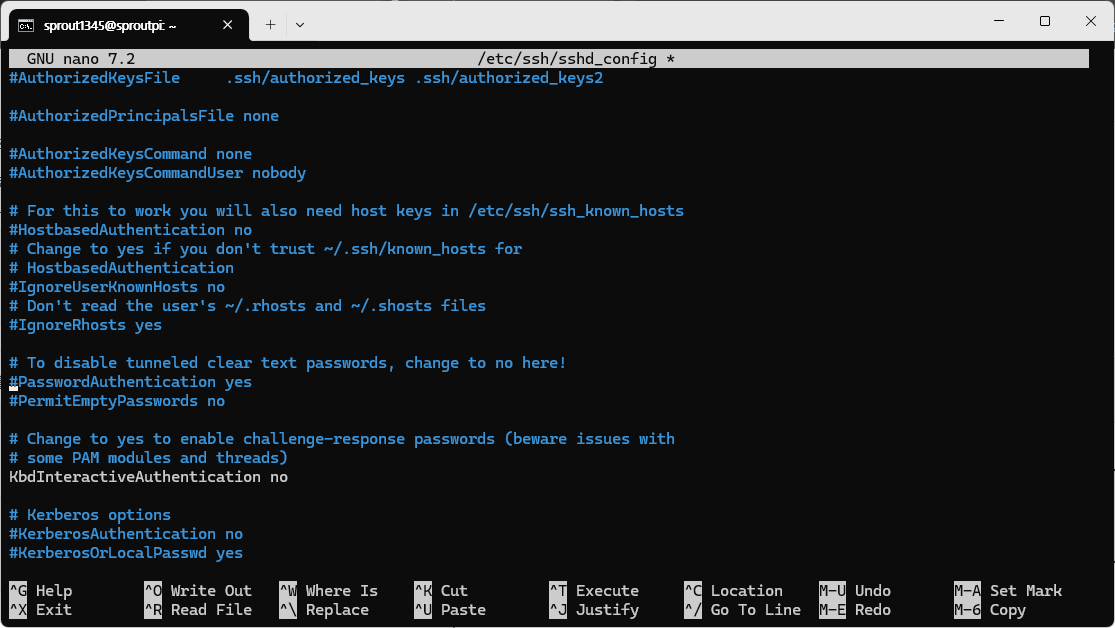
PasswordAuthentication no
PubkeyAuthentication yes
해당 항목을 찾아서 위와 같이 수정한다.
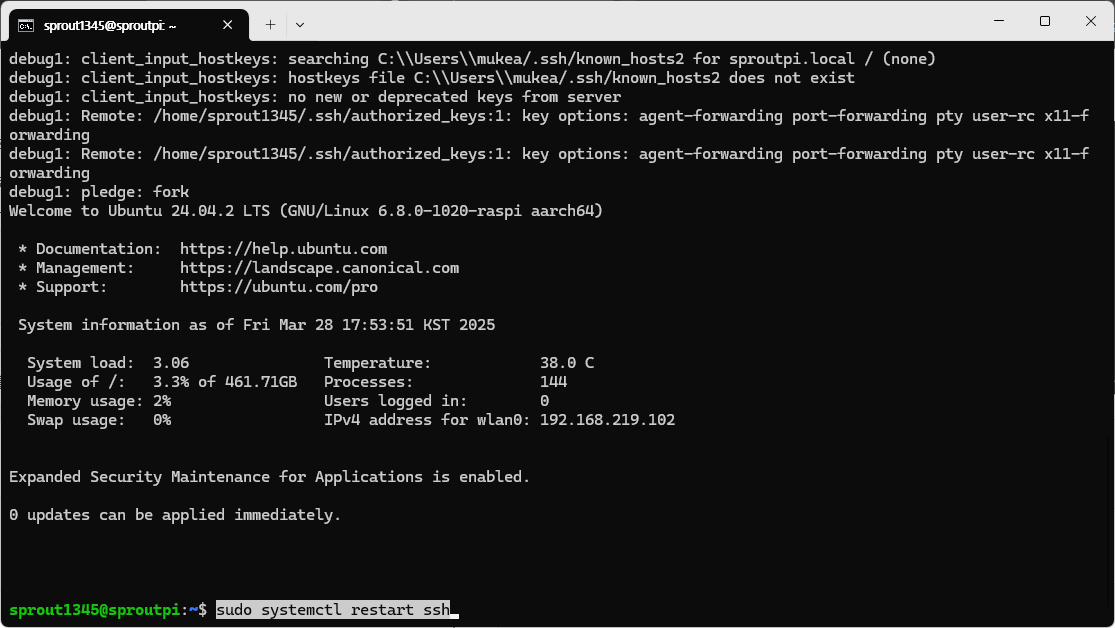
sudo systemctl restart sshSSH 서비스를 재시작한다.
728x90
반응형
'Raspberry Pi' 카테고리의 다른 글
| Raspberry Pi #18 - Raspberry pico (0) | 2026.08.01 |
|---|---|
| Raspberry Pi #17 - PPA를 이용한 APT 저장소 추가 (0) | 2026.07.01 |
| Linux 모니터링 명령 (0) | 2026.06.01 |
| Raspberry Pi #16 - SSH 접속 키 변경하기 (0) | 2026.03.15 |
| Raspberry Pi #15 - UART 포트를 이용해 아두이노와 시리얼 통신 (0) | 2026.02.15 |


댓글